Read the Summary
A chart or table for every question, NPS and averages, trends over time, and the controls to slice them.
Every plan
On this page
The Summary shows how many people answered each question and what they said.
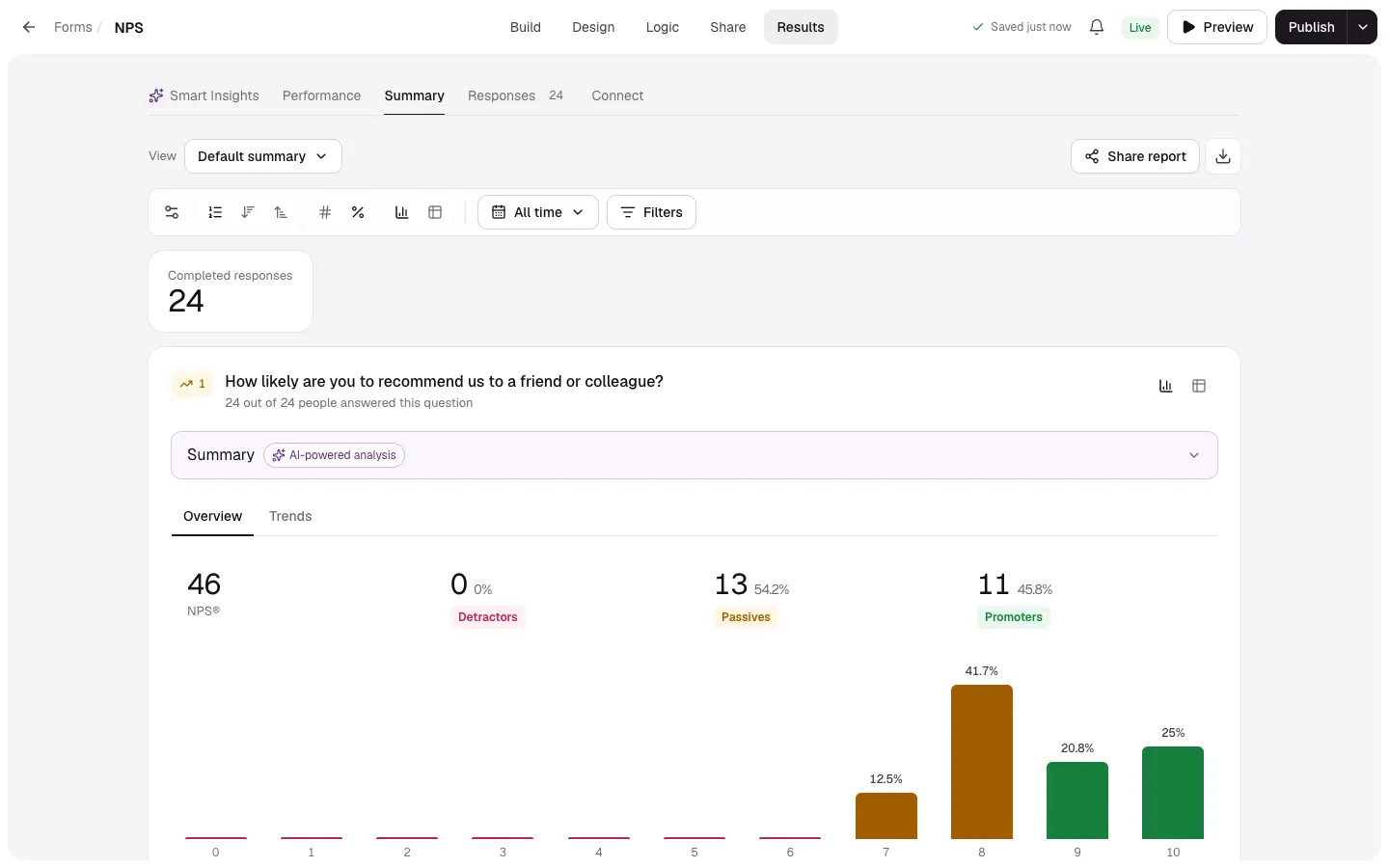
What each question shows
| Question | Summary |
|---|---|
| Choices, yes/no, dropdown | Bars with counts or percentages. Click a bar to see those responses. |
| Rating, opinion scale, number | Average and median (plus range and standard deviation for numbers) with the distribution. |
| NPS | Your score with Detractors, Passives and Promoters. |
| Ranking | Options in order of their average position. |
| Matrix | A grid of how often each column was picked for each row. |
| Payment | Total collected and the number of payments. |
| Text | The latest answers. On Pro, AI analysis of the themes. |
Controls
- Filters and the date range apply to every chart. See filter responses.
- Charts or tables, Numbers or percentages, and Sort answers: form order, most picked first or least picked first.
- Overview or trends: switch a question to a trend over time, grouped Daily, Weekly or Monthly.
- Question settings: show or hide questions in the Summary.
- Saved views keeps a combination of all of these. See saved views.
- Share report makes a live link. See share a live report.
- Download summary as PDF or CSV. See export.
Uploads saved to Google Drive show an Uploads in Google Drive card with Open folder →.